
Arkansas Weather Network
Arkansas Weather Network LLCWeather
4.351.00 Reviews
- Version
- 6.7.1.7
- Installs
- 10.00K
- Age Rating
- Everyone
Screenshots
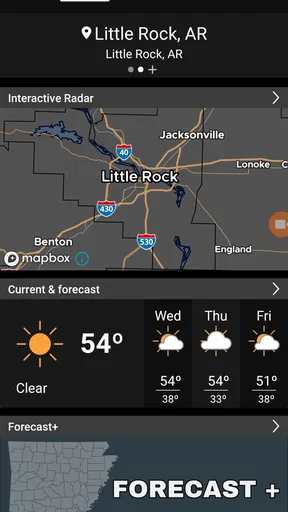
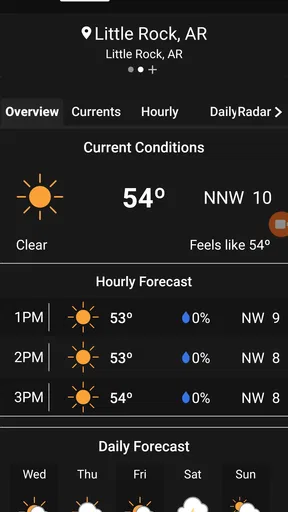
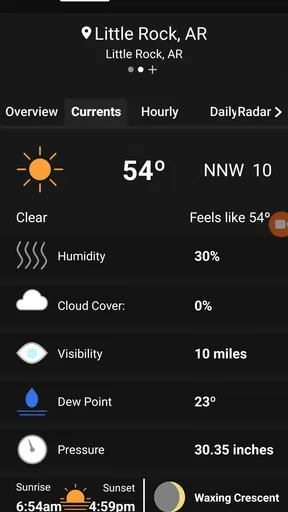
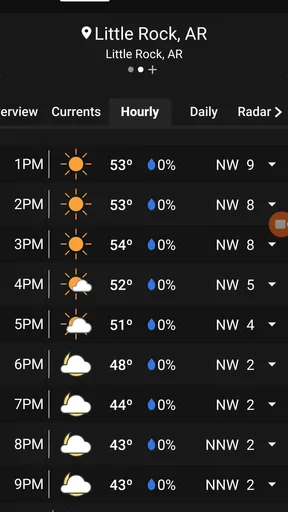
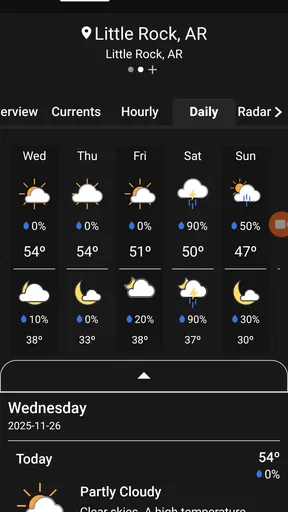
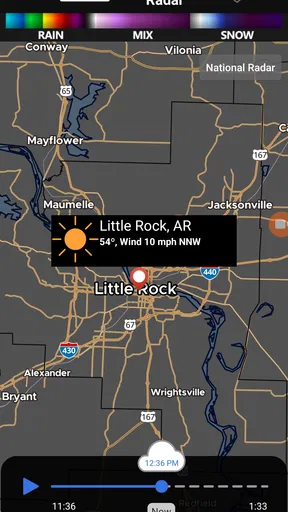
Our Review of Arkansas Weather Network
 Analysis by Appyee
Weather apps are easy to judge on a calm day, when a forecast loads quickly and the sky behaves as expected. The real test comes when I am leaving home, driving across Arkansas, or trying to decide whether an outdoor plan should continue while conditions are changing. That is where Arkansas Weather Network feels most purposeful: it is a weather app built around Arkansas rather than a broad national service that treats the state as one small area on a map.
Developed by Arkansas Weather Network LLC, this free app focuses on statewide coverage and real-time local reporting. I found that focus useful because Arkansas weather can change noticeably between communities, especially when a storm line is moving through or when one part of the state is dealing with rain while another remains clear. The app is rated for Everyone, runs on Android 7.0 or later, and its current version is 6.7.1.7.
My overall impression is positive, but with an important qualification: this is a connected weather experience. Its usefulness depends on being able to reach current information when I need it. That makes the app valuable for people who regularly check Arkansas conditions on the move, while making it less suitable as a sole source of reassurance in places with unreliable mobile service.
How the app feels when the network matters
The first thing I noticed is that the app’s purpose becomes clearer when the weather is unsettled. A general weather app may give me a forecast for a selected city, but Arkansas Weather Network is aimed at the kind of local awareness people want when conditions are developing nearby. The distinction is not simply the word “Arkansas” in the name. The entire concept is centered on statewide, real-time coverage and the people watching those conditions.
That emphasis changes how I use it. I am less likely to open it casually just to see a generic temperature and more likely to check it before a drive, a work shift outdoors, a school activity, or a trip between towns. When the connection is good, the experience is straightforward: open the app, allow the current information to load, and use the latest view to make a practical decision.
The key trade-off is freshness versus connectivity. A live weather service is useful precisely because it can reflect changing conditions, but that also means the app is most dependable when the phone can communicate with its service. I would not treat a screen that loaded earlier as proof that conditions remain unchanged. If I am heading into an area where coverage may disappear, I check before leaving and avoid assuming that the same information will remain current throughout the journey.
This is especially important during fast-moving weather. A forecast can be broadly correct while still being unhelpful for a specific moment in a specific community. A local network’s value is the ability to keep my attention on Arkansas conditions, but I still need to interpret what I see rather than expecting any app to remove uncertainty from the weather.
Using it before leaving home
My most useful routine is to check the app twice when a day matters: once while planning and again shortly before departure. The first check helps me decide whether I need extra time, different clothing, or a change of plans. The second check is more important when rain or storms are possible, because the situation may have developed since breakfast.
This two-step habit is more practical than repeatedly staring at a forecast throughout the day. It also reduces the risk of treating an old screen as current. If the app has trouble loading at the second check, I know that the problem is not necessarily the weather information itself; it may be the connection at that moment. That distinction is easy to miss when I am rushing out the door.
For a person who spends most of the day in one Arkansas community, the app can become a quick local checkpoint. For someone crossing the state, I would use it as part of a broader preparation routine. I would check the route, note where connectivity may be weaker, and make decisions before driving rather than interacting with the phone continuously on the road.
Why mobile context changes the experience
On a phone, weather information competes with everything else: navigation, messages, calls, and limited attention while walking or traveling. Arkansas Weather Network works best when I use it in short, deliberate sessions. I open it, look for the information relevant to my location or route, and close it once I have made a decision.
That approach is particularly helpful for commuters and outdoor workers. Before leaving for a job site, I can check whether the day’s conditions justify waterproof clothing or a schedule adjustment. Before taking a child to an outdoor event, I can make a more informed choice about whether to go, delay, or bring a backup plan. The app’s regional focus gives those decisions more context than a weather screen that feels designed for an entire country.
There is also a safety benefit in separating checking from driving. I prefer to review the app while parked, at home, or before setting off. If conditions become serious while I am already traveling, the correct response is to stop somewhere safe or rely on a passenger, not to keep refreshing a phone. A weather app can support a decision, but it should not become a distraction.
People with older Android phones may find the minimum operating system requirement reassuring because Android 7.0 is not limited to recent hardware. Still, the quality of the experience will depend on the phone’s general condition and the network available where it is being used. An older device with a weak connection may feel slower than a newer phone on a strong one, so I would judge the app in the places where I actually need it rather than only at home.
A realistic day with changing conditions
Imagine I am planning to drive from one Arkansas community to another for an afternoon appointment. In the morning, the forecast may look manageable, so I prepare normally. Before leaving, I open the app again because the route matters more than the weather at my front door. If the latest information suggests developing rain or storms, I can leave earlier, reconsider the trip, or plan a safer stopping point.
During the drive, I do not expect the app to replace observation, road awareness, or official emergency guidance. If the connection disappears, I may not be able to confirm what has changed ahead. That is why the important action happens before departure: I use the app to inform the plan, not to create a false promise of continuous awareness.
For an outdoor worker, the same workflow is even more useful. A morning check can guide clothing and equipment choices, while a later check can help decide whether to continue an activity. The advantage is not that the app makes a perfect decision for me. It gives an Arkansas-centered place to begin that decision when local conditions matter.
What happens when loading fails
Any network-dependent weather app can feel frustrating when the information does not appear at the moment I need it. With this app, I would first treat a failed or incomplete load as a connectivity problem rather than immediately assuming that the service has no useful information. I check whether the phone has a working connection, move to a place with better reception if practical, and try again when it is safe.
The important limitation is that I do not rely on a failed refresh as an offline forecast. If current information has not loaded, I cannot responsibly treat yesterday’s view or a partially displayed screen as a live update. For important travel or outdoor decisions, I make a habit of checking while connected and leaving with a basic plan that does not depend on continuous access.
This is where a traditional broadcast source or another established alert channel may be a better companion. A radio, official emergency notification, or local public safety message can remain valuable when a phone connection is unreliable. I see Arkansas Weather Network as a useful part of that safety setup, not as a reason to discard every other source.
Recovery is also easier when I avoid frantic repeated refreshing. If the app does not respond, I pause, verify the connection, and retry once I have moved or the service has returned. Repeated attempts in a weak-signal area can waste battery and data without improving the result. A calm fallback routine is more useful than assuming that another tap will solve everything.
Using it without wasting mobile data
Because the app is designed around current weather information, I would use it intentionally on mobile data. I do not need to keep it open all day to benefit from it. A morning check, a pre-departure check, and a check before an outdoor activity are enough for many ordinary routines. During rapidly changing conditions, I may check more often, but I still avoid unnecessary browsing.
Wi-Fi is the sensible choice for routine planning when it is available. I can review the day’s conditions at home before leaving, then use mobile data only when a later check is genuinely useful. This is a small habit, but it matters to people with limited data plans or phones whose battery is already under pressure.
Battery awareness is part of the same trade-off. A weather app is not something I want competing with navigation or an emergency call when I am traveling. I check it before the journey, keep the phone charged for the route, and avoid leaving the app running without a reason. The goal is not to minimize every connection; it is to reserve the phone’s resources for decisions that matter.
I also prefer to interpret local information in context. If I am planning a long trip, I check conditions at more than one point along the route when possible rather than assuming that the weather at departure represents the entire drive. That is a more advanced use of a statewide weather service: the state focus becomes helpful when I think in terms of movement between areas, not just one home location.
Where it beats general weather alternatives
Compared with a large national weather app, Arkansas Weather Network has a clearer regional identity. A national service may be better for someone who travels constantly across different states or wants one familiar interface everywhere. It may also be the more convenient choice for a user who already has all their locations and alerts organized there.
For an Arkansas resident, however, a local network can feel more relevant. The app’s strength is not that it tries to be everything for everyone. Its strength is that it keeps Arkansas at the center of the experience. That makes it a natural choice for people whose daily decisions depend on conditions within the state.
Compared with simply searching the web, a dedicated app is more convenient for repeated checks. I do not need to begin from a blank search each time. Compared with looking only at a single built-in phone weather widget, the regional purpose gives me a reason to seek information beyond a basic temperature glance. The trade-off is that a general search or national service may offer broader travel context, while this app is more focused.
I would not recommend making it the only weather tool for someone who needs extensive international forecasting, broad multi-state planning, or a highly specialized professional meteorological workflow. Its appeal is strongest when Arkansas is the place that matters. If that is not your situation, the regional focus may feel narrower than useful.
Who should install it
I think this app is a good fit for Arkansas residents, people who work outdoors in the state, families planning local activities, and drivers who regularly move between Arkansas communities. It is also worth considering for anyone who prefers a local weather identity over a generic national forecast screen.
The audience size is still developing. The app has passed ten thousand installs, with a 4.3 average from 107 ratings and 51 written reviews. Those figures suggest a real user base and generally favorable reception, but they do not make the app universally proven. I would read that as encouragement to try it, not as a guarantee that every phone, location, or connection will behave identically.
Since it is free, trying it carries little financial risk. The age rating of Everyone also makes it suitable for a broad household audience. I would still judge it by my own routine: if I need Arkansas-specific awareness and have dependable connectivity, it makes sense; if I mainly need worldwide travel planning or must depend on information in disconnected areas, another solution may be more appropriate.
My conclusion on connectivity and everyday value
Arkansas Weather Network succeeds when I use it as a focused, connected tool for making local decisions. Its Arkansas-centered approach gives it a clear role, especially before travel, outdoor work, and plans that can be disrupted by changing conditions. The free price and broad device compatibility make it easy to test without much commitment.
Its main weakness is also clear: live usefulness depends on access to the service. I would not assume that a previous screen remains current, and I would not plan a remote journey around the expectation of uninterrupted updates. Checking before leaving, conserving mobile data, and keeping a separate fallback for serious conditions are sensible habits.
My recommendation is straightforward: install it if Arkansas is where your weather decisions happen and you want a local-first app for regular checks. Skip it if you need a universal travel weather system or an experience that can be trusted without a connection. For the right user, it is a practical companion—not because it eliminates uncertainty, but because it helps put Arkansas conditions in front of me when a connected phone can make the difference between guessing and preparing.
Verdict
Strengths of Arkansas Weather Network
- Provides localized forecasts for Arkansas communities.
- Useful radar views help track approaching storms.
- Weather alerts can support quick safety decisions.
- Includes current conditions and short-term outlooks.
- Simple layout makes key weather data easy to find.
Limitations of Arkansas Weather Network
- Coverage may be less useful outside Arkansas.
- Some features may depend on an active internet connection.
- Forecast accuracy can vary during rapidly changing weather.
- Frequent alerts may feel excessive during severe weather.
- The app may offer fewer customization options than major weather apps.
Similar Picks in This Category
View All
Weather - By Xiaomi
Xiaomi Inc.4.1

Weather & Radar Forecast
WetterOnline4.8

Weather
OneLouder Apps4.6

AccuWeather: Weather Radar
AccuWeather3.6

The Weather Channel - Radar
The Weather Channel4.6

1Weather Forecasts & Radar
OneLouder Apps4.3
Frequently Asked Questions
What is Arkansas Weather Network?
Arkansas Weather Network is a weather-focused app designed to help users follow current conditions, forecasts, radar information, and severe weather updates across Arkansas. It can be useful for checking local temperatures, precipitation chances, wind, and storm activity in one place. Coverage and available features may vary by location, so users should confirm that their area is supported before relying on the app for regular forecasts.
Does Arkansas Weather Network provide severe weather alerts?
The app is intended to keep Arkansas users informed about changing weather and potentially dangerous conditions, including thunderstorms, heavy rain, flooding, tornadoes, and winter weather. Alert availability may depend on the app’s notification settings, location permissions, data sources, and the specific region selected. For life-threatening situations, users should also follow official National Weather Service alerts and local emergency instructions.
Can I use Arkansas Weather Network to check weather in my specific city?
Yes, the app is primarily aimed at localized Arkansas weather information, allowing users to follow conditions and forecasts for a selected city or area. After installation, you may need to enable location access or manually search for your community. Forecast detail can differ between towns, particularly during severe weather, so selecting the closest available location generally provides the most relevant results.
Does Arkansas Weather Network require location access or an internet connection?
An internet or mobile-data connection is normally needed to download updated forecasts, radar images, observations, and alerts. Location permission may be requested to automatically identify your current area, although you can often choose a location manually if you prefer not to share precise location data. Without connectivity, previously loaded information may be outdated and important weather changes could be missed.
Is Arkansas Weather Network free to download and use?
Arkansas Weather Network may be available as a free download, but the exact experience can depend on the platform, version, advertising, and any optional features offered by the developer. Before installing, review the app-store listing for current pricing, in-app purchases, supported devices, and privacy details. It is also wise to check whether notifications or background data use can be customized.
